Waydroid A17 NVIDIA: hardware-accelerated Android 17 on NVIDIA Linux desktops
If you have tried Waydroid on an NVIDIA GPU, you have probably seen one of two things: software rendering slow enough to feel like a slideshow, or a container that never starts. Waydroid’s graphics stack is built around Mesa. Intel and AMD have drivers there; NVIDIA users are left out.
So I built Waydroid A17 NVIDIA: LineageOS 24.0 (Android 17) in Waydroid, with the GPU, hardware video decode and encode, root and desktop integration all working. On Arch Linux it is one yay -S waydroid-a17-nvidia-bin away.
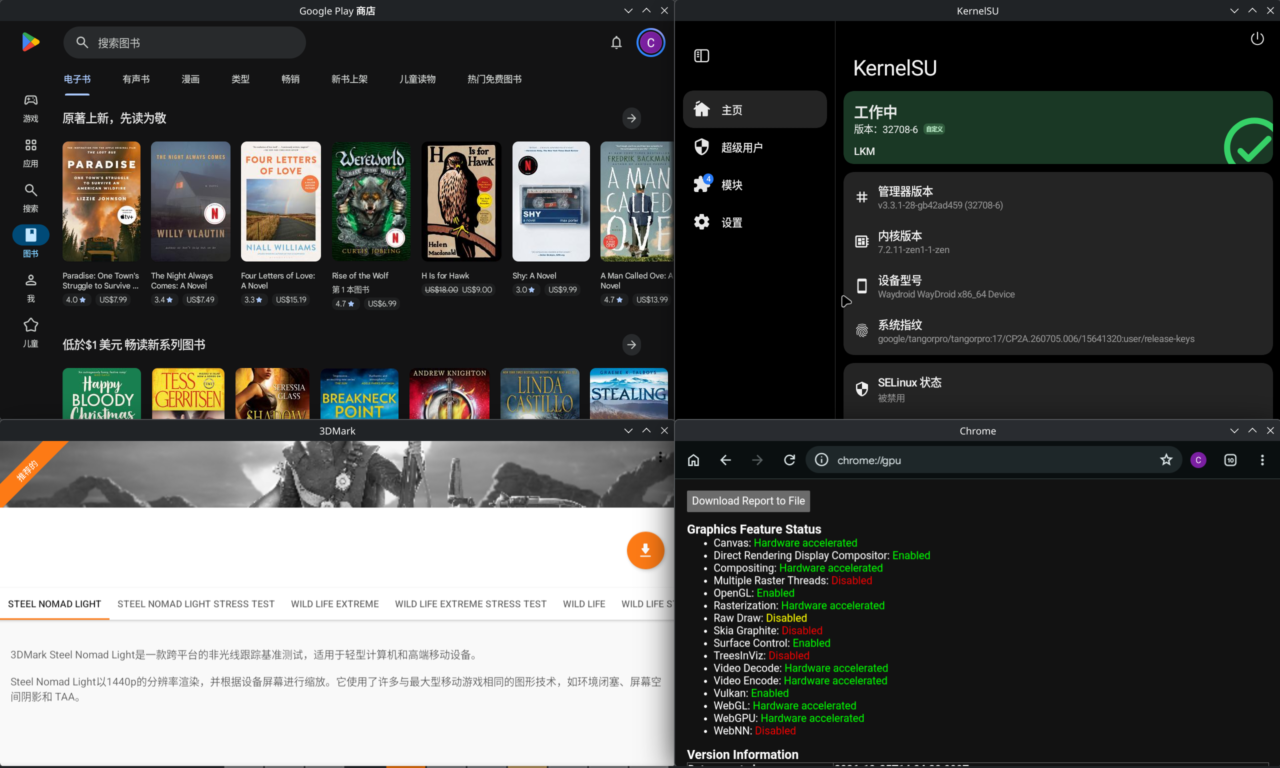
1. What works
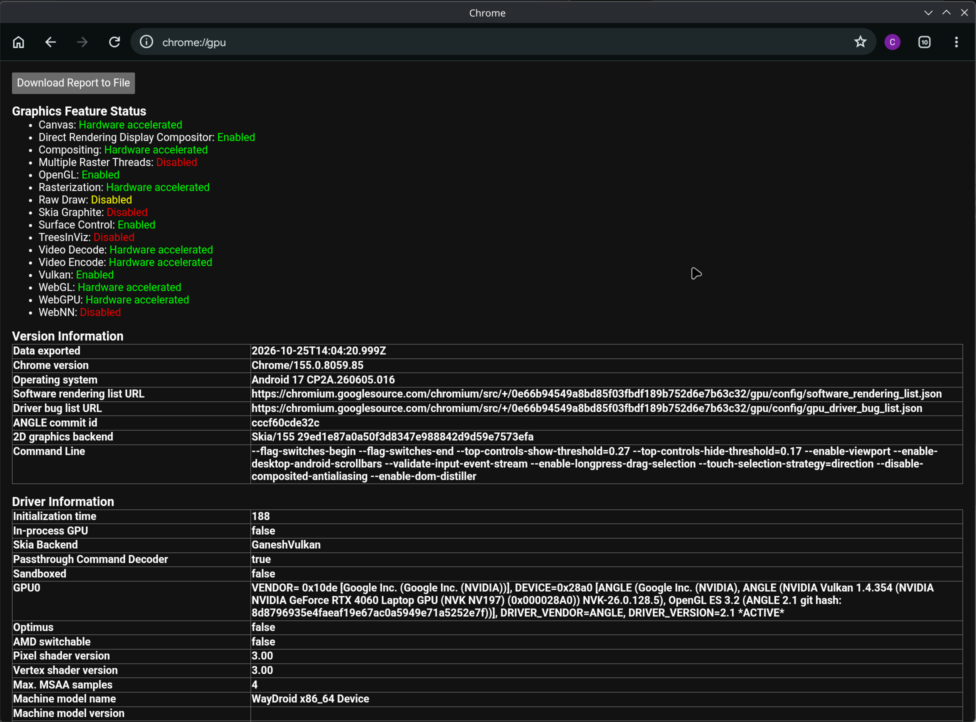
- GPU acceleration: ANGLE → NVK → the NVIDIA kernel driver. The UI (HWUI) renders with Vulkan. WebGL and WebGPU work in Chrome.
- Hardware video decode: H.264, HEVC, VP9 and AV1 on NVDEC. YouTube, Chrome and video players use it automatically.
- Hardware video encode: H.264, HEVC and AV1 on NVENC. Chrome’s WebCodecs and WebRTC video calls encode on the GPU.
- Apps as desktop windows: each Android app gets its own KDE window; KWin moves, resizes and closes it, and remembers where it was.
- Host input method: type in Android with fcitx5 or ibus; the candidate window follows the cursor.
- Clipboard and files: two-way clipboard, and
~/Downloadsshows up in Android asDownload/Host. - Root: KernelSU on the host kernel, with modules (Zygisk Next, LSPosed and friends).
- Google apps: with WayDroid-ATV’s GAPPS system image, the Play Store is certified.
| Chrome: everything hardware accelerated | YouTube on NVDEC |
|---|---|
 |
 |
Performance on my RTX 4060 Laptop:
| Benchmark (4K, Vulkan) | Host, NVIDIA driver | Waydroid |
|---|---|---|
| Basemark GPU, Medium, offscreen | 35657 | 29369 (82%) |
| 3DMark Wild Life Extreme | — | 12300–13100 (≈ 74 FPS) |
Basemark on Android only ships ETC2 textures, which NVK has to emulate, while the host uses BC7, so the comparison favours the host. GPU time per encoded 1080p frame: H.264 1.7–2.4 ms, HEVC 2.0 ms, AV1 1.4 ms.
2. How it works
NVIDIA’s proprietary userspace driver is written for glibc desktops and cannot run inside Android. The key is the nvidia-prolapse mode from Shiro836/waydroid-nvidia:
- NVK: Mesa’s open-source NVIDIA Vulkan driver, built for Android.
- Rust RM: a userspace RM client written in Rust that talks directly to the host’s NVIDIA open kernel modules, replacing the proprietary userspace libraries.
- ANGLE: translates GLES to Vulkan and hands it to NVK.
- NVDEC / NVENC: Codec2 components that drive the GPU’s video engines directly.
The vendor image contains no proprietary NVIDIA files at all.
Upstream officially supports only Android 13 (LineageOS 20). My part was bringing it to Android 17: the system image is WayDroid-ATV’s LineageOS 24.0, used unmodified; the vendor image is built from ATV’s A17 device tree plus the ported NVIDIA stack. After that came the everyday pieces: multi-window, input method, clipboard, file sharing and audio, and a Rust rewrite of the codec cores.
3. What broke on Android 17
Each of these was either “does not start” or “starts but is wrong”. A few representative ones:
- SurfaceFlinger:
Failed to create a valid texture. A17’s minigbm widenedusagein the buffer handle fromint32_ttoint64_t, growing the handle from 35 ints to 36, while the prebuilt HAL expects 35. Narrowing it back fixed it; the handle only uses the low bits of usage. - HWUI assertion
queueCount < kRequestedQueueCount. A17’s HWUI opens 2 queues on the graphics family, one for the render thread and one for the bitmap upload thread, submitting concurrently. NVK reported only 1. It now reports 2; each VkQueue already had its own GPU channel, so the Rust backend needed no change. - KernelSU’s
ksudkilled by SIGSYS. Waydroid’s LXC seccomp profile blocks everyreboot(2), and KernelSU usesreboot(0xDEADBEEF, …)to obtain its driver fd. The rule now lets only that magic value through; every other reboot is still blocked. - Clicking a window closed the app. The task service transaction codes in the A17 system image are stale:
setFocusedTaskactually landed onremoveTask. hwcomposer now callscmd activity/cmd windowinstead. - Audio almost inaudible. The system image sets the default media volume to 16, above the maximum of 15, so it is discarded and falls back to one third. A vendor property sets it to 15.
4. Tested on your GPU before it is installed
Something tested on one machine can easily go quietly wrong on someone else’s. So the installer, waydroid-nvidia-setup, never just swaps the image in:
- it runs a gate of GPU tests on your GPU and the kernel module currently loaded;
- only if they pass does it install the image, keeping your official vendor image as a backup;
- if any step fails, it states the reason and the remedy, and puts the previous image and configuration back.
The Rust RM matches the kernel ABI to the exact NVIDIA driver version and refuses versions it does not know, rather than guessing. After a driver update, Waydroid asks you to run the setup again, which re-gates the image on the new driver.
5. Install
Arch Linux:
1 | yay -S waydroid-a17-nvidia-bin |
Then add the system image (WayDroid-ATV 20261017, GAPPS or VANILLA) and set up:
1 | sudo mkdir -p /etc/waydroid-extra/images |
You need the NVIDIA open kernel modules and binder (binderfs). Other distributions and root setup are covered in the project README.
6. A side project: a VA-API driver for the host
The same Rust RM works on the host too. nvrm-vaapi-driver (same name on the AUR) is a VA-API driver that drives NVDEC and NVENC through the RM: browser hardware decoding, and Sunshine encoding over VA-API for Moonlight streaming, both tested and working.
7. Limitations
- A personal project, tested on one machine: RTX 4060 Laptop, NVIDIA open driver 615.78.08, KDE Plasma 6 Wayland, Arch Linux.
- Widevine is L3, so streaming apps usually play SD.
- It does not pass Play Integrity’s device integrity check, so apps that enforce it (banking, for example) do not work.
Issues and PRs are welcome.
Acknowledgements
This project would not exist without Shiro836/waydroid-nvidia: the nvidia-prolapse mode, NVK and the Rust RM, ANGLE, the NVDEC component and most hwcomposer fixes come from there. The Android 17 system image, device tree and KernelSU for Waydroid come from WayDroid-ATV (supechicken). The NVENC encoder core comes from mickys/nvenc. Thanks also to Waydroid, LineageOS, KernelSU, Mesa and ANGLE.